Weather Information with Golang and Weather API
efrans christian
Summary
This Weather Information application is an application that provides weather information using HTML5 technology for the user interface, Golang as a backend server, and Weather API to obtain the latest weather data. This application allows users to access weather data in various locations with a simple and responsive display. HTML5 is used to create an interactive and easy-to-use interface, while Golang supports fast and efficient data processing on the backend. Integration with the Weather API ensures that the data displayed is always accurate and up-to-date.
Description
The Weather Information application developed uses HTML5 for the interface, Golang as the backend, and Weather API to provide the latest weather data. The following is a complete description of each component:
1. User Interface (HTML5)
The user interface uses HTML, CSS, and JavaScript to create a responsive, simple, and accessible display.
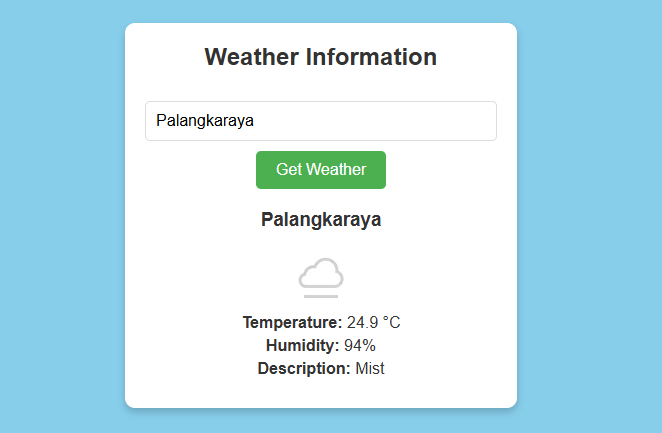
The main page contains text input to enter the city name as well as a button to start searching for weather data.
Weather results, such as city name, temperature, humidity, weather description, and weather condition icon, will be displayed inside the div element if the data is successfully retrieved from the backend.
If an error occurs, for example because the city is not found, an error message will be displayed on the page.\
2. Backend (Golang)
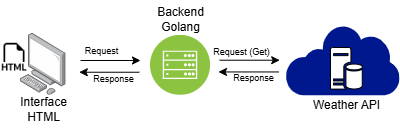
This backend is built using Golang and serves as a link between the user interface and the Weather API.
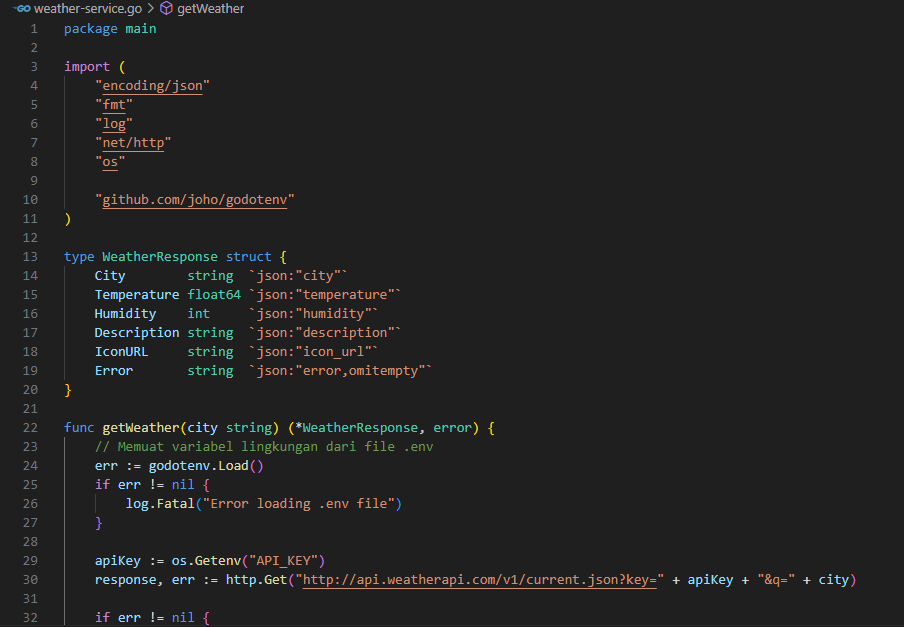
The weather-service.go program in the backend provides a /weather endpoint that accepts city parameters from the user interface.
This backend will send requests to the Weather API, process the response data from the API, and return it to the user interface in JSON format, which includes city information, temperature, humidity, description, and weather icon URL.
3. Weather API
The application utilizes the external Weather API to obtain real-time weather data based on the city entered by the user.
Once the backend receives the city name, it sends a request to the Weather API to obtain the required weather data.
The data from the API is processed and sent back to the user interface to be displayed in an easy-to-understand view.
With the integration between an interactive interface, an efficient backend in Golang, and access to the Weather API, this application provides a responsive user experience as well as accurate and up-to-date weather information.
The security aspects that are implemented include:
1. Input Validation:
The program sanitizes the input from the user to ensure the parameters received, such as city names, are valid. This helps prevent injection attacks, such as SQL injection or command injection, which can occur if the input is not properly verified.
- Ensuring the Input is Not Empty:
Before sending the request to the backend, the app checks if the user has entered the city name in the text input. If the input is empty, the user is prompted to “Please enter a city name” via an error message in the
- Trim Input:
JavaScript uses the trim() method to remove excess spaces around the text input, thus avoiding possible errors or invalid input if the user only enters blank spaces
2. Error Management:
The program manages errors well and provides specific but not too detailed error messages, so sensitive information is not exposed to the user. This helps in reducing the risk of information that can be exploited by an attacker to gain further system details.
3. API Key Security:
These API keys are stored in environment variables and are accessed only by the backend.
GitHub : https://github.com/envo30/weatherInformation.git
Informasi Course Terkait
Kategori: Cyber SecurityCourse: Persiapan Sertifikasi Internasional CyberSAFE (Cyber Security Awareness For Everyone)