Sentiment Analisys Review Call of Duty Mobile
ZAID SYARIF HIDAYAT
Summary
Natural language processing (NLP) refers to the branch of computer science—and more specifically, the branch of artificial intelligence or AI—concerned with giving computers the ability to understand text and spoken words in much the same way human beings can.
NLP combines computational linguistics—rule-based modeling of human language—with statistical, machine learning, and deep learning models. Together, these technologies enable computers to process human language in the form of text or voice data and to ‘understand’ its full meaning, complete with the speaker or writer’s intent and sentiment.
NLP drives computer programs that translate text from one language to another, respond to spoken commands, and summarize large volumes of text rapidly—even in real time. There’s a good chance you’ve interacted with NLP in the form of voice-operated GPS systems, digital assistants, speech-to-text dictation software, customer service chatbots, and other consumer conveniences. But NLP also plays a growing role in enterprise solutions that help streamline business operations, increase employee productivity, and simplify mission-critical business processes.
Description
- Install Google Play Scraper for Scraper Review from Google Play and connect your google Drive to googlecolaboratory because we use google colab for IDE

2. BUILDING DATASET
the first Import Library, then we write the code for scraper review from google play, show Data scrapper and the last save the data to csv


3. After we create the dataset nlp, the next stage is processing the data
The first is connect googledrive to google colaboratory and install Library

4. IMPORT LIBRARY

5. Load Dataset using pandas, and show the data using function in pandas

6. Case Folding the dataset

7. Filtering the Data

8. Tokenization data

9. Slang Word to Standard Word

10. Steaming using Sastrawi

11. Feature Extraction

12. Split Data

13. Train and test the data using Machine Learning Naive Bayes Model

14. Train and test data using Machine Learning SVM Model

15. Processing data for Deep Learning model
the first is connect google drive to google colab and install Library

16. IMPORT LIBRARY

17. Load Dataset

18. Case Folding

19. NLP Processing using BeautifulSoup

20. Stopword and Tokenization data


21. Create Model


22. Create LSTM Model for Deep Learning

23. Show the model and split data

24. Fit the model

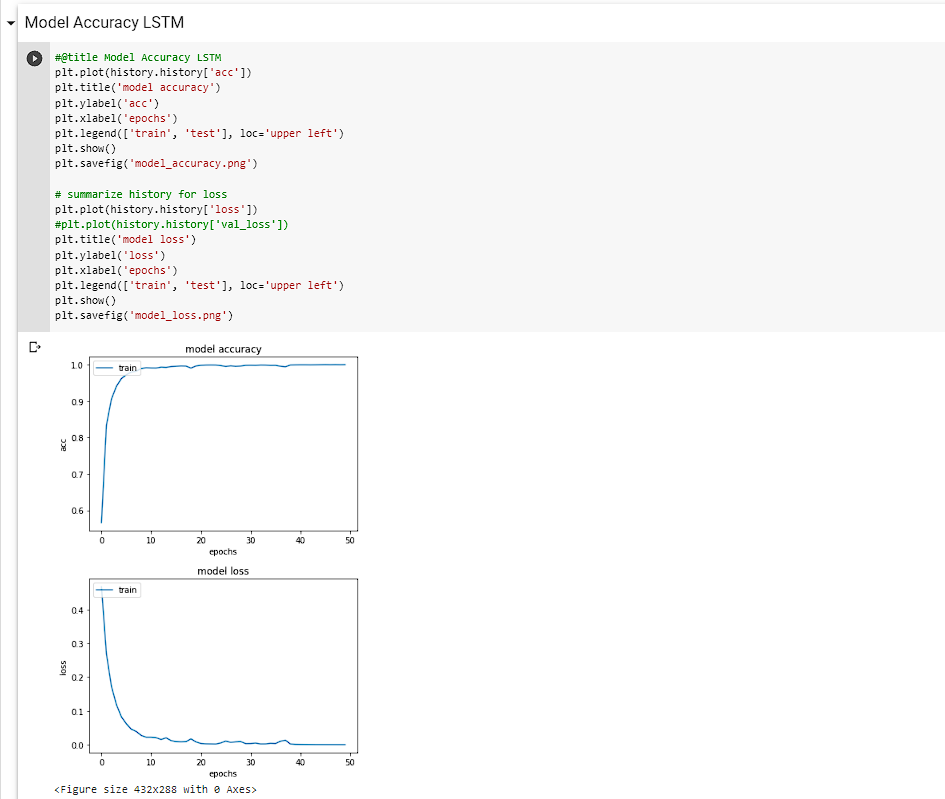
25. Run the Model Accuracy & Loss LSTM

26. Evaluate model & Validation

Informasi Course Terkait
Kategori: Natural Language ProcessingCourse: Riset Kecerdasan Artifisial (SIB AI-RESEARCH)